RemoteLock & Guesty integration: 4 simple steps



Summer’s hot vacation rental market is here. Property managers looking for smooth sailing for their guests and themselves know efficiency is the name of the game. Everyday tasks like cleaning, guest messaging and access can quickly add up and even overwhelm you and your staff if not managed well. Automation ensures all those mundane, yet important, details are taken care of, leaving you and your staff more time to shine with guests.
If you’re using Guesty, you’re happily familiar with how this software automates guest messaging and responses, pricing and more. Now, let’s make sure you’ve turned on your RemoteLock-Guesty integration for the ultimate automation, delivering self-expiring access codes to guests. The following high-level steps walk you through the process. For further details, see our support article.
Step 1: Generate your client ID and secret key in Guesty
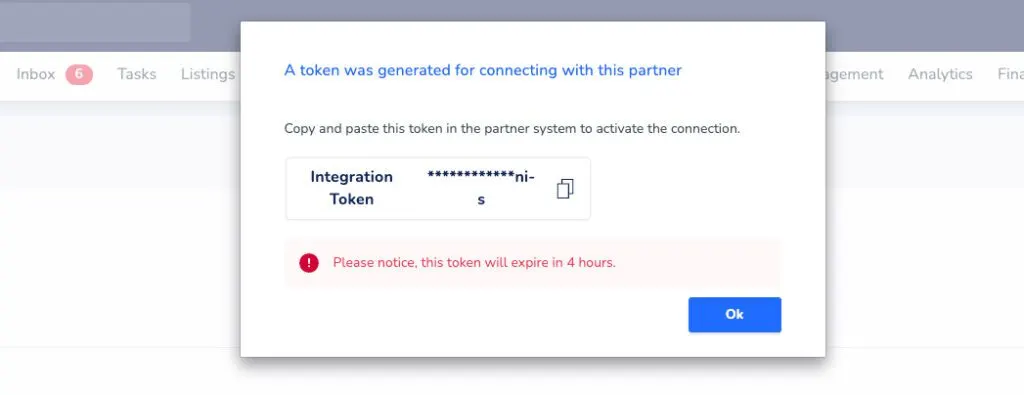
To integrate your connected locks with Guesty, you’ll need to first generate a Client ID and Client Key on the Guesty system, and then enter those credentials into your RemoteLock online portal. To generate your Guesty API Key, log into Guesty.
Vacation rental operations, made easier
Get practical ideas on turnovers, guest communication, and access automation for short-term rental teams.
- Navigate and click on “Marketplace” under “Integrations” on the main navigation.
- Find and click on the RemoteLock tile. It is listed under “Home Automation.”
- Once on the RemoteLock page within Guesty, click the “Connect” button.
- A box should appear with an “API Key” which may look like asterisks and some text. Click on that API Key, and it should be copied to your clipboard.
Step 2: Paste your Guesty key into the RemoteLock portal
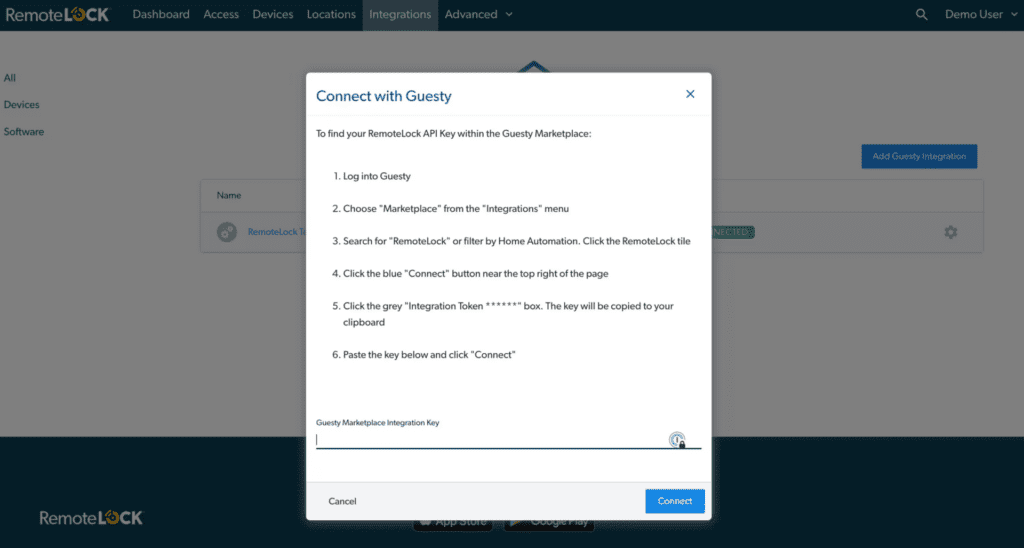
After you’re redirected back to the RemoteLock portal, you’ll paste this key into the Guesty Integration tile in the RemoteLock portal and click “Connect.”
Step 3: Map each property to the correct door lock
To automatically generate guest access PIN codes, the RemoteLock system needs to know which door locks are installed at each rental property. When viewing the rental property listings for an integration, begin by clicking the gear icon to the right of the property listing.

Step 4: Add your locks to finish the setup
Select the Add Door button, and a list of door locks within your RemoteLock account is displayed. Choose the lock that is installed at this property and then click “Add.”
Once door locks are associated with your rental property listings and the integration is shown as “Connected,” the integration is active. Guest access should then be automatically generated for new reservations.

Integrating RemoteLock & Guesty for the first time?
If you have reservations that were made in Guesty before you connected your RemoteLock account or before you saved the mapping between the Guesty Listing and the RemoteLock device, take one further step. Please update any previous reservations in Guesty in order to have RemoteLock pick them up. An update to a Guesty reservation could be any change to the reservation including a note or name change. As RemoteLock checks Guesty for new reservations or changes to your reservations at 30-minute intervals, the software recognizes those updates and creates these retroactive reservations.
Review our support article for further details, as well as another article that details how guests receive their access codes via Guesty’s KeyCode and automated messaging. But the easy steps above will set you on your way to integrating RemoteLock with Guesty, and streamlining guest check-ins across your rental properties.
Built for growing vacation rental portfolios
See how automated access and guest tools scale with your business.

RemoteLock has been automating access control and improving on-site property operations efficiencies across multiple industries, including vacation rental and multifamily, for more than ten years. As a leading access-centered property operations software platform provider with more than 10,000 customers in 75+ countries, RemoteLock helps property managers enable, control, and automate access and climate control across their portfolio. RemoteLock’s platform saves property managers time and money through the elimination of tasks for onsite staff and helps scale businesses with greater confidence. It is differentiated by its dozens of integrations with applicable hardware and business software systems for an easy-to-use, turn-key solution.
Access that Works Everywhere
One flexible platform built to support modern properties, no matter who needs access or how your portfolio scales

Interested in learning more?
Explore blogs, webinars, and videos related to what you just read

When the internet drops, your guest still needs to get in
The maintenance request that never gets logged
Access that matches the schedule, not the other way around